
“If you’re continuously struggling with pain points and investing manual labor to put out fires,” the problem isn’t you; it’s your marketing process.
But how do you fix your marketing process when all your time is devoted to actually marketing?
Today’s expert is one of the architects of the process map that saved one team 800 hours of labor. And he shares a time-saving (and chaos-reducing) strategy that can scale to any size business. I’m not gonna sugarcoat: It’s an investment of effort.
“It is a time commitment. And you are wasting a lot of time if you don’t do it.”

Shining a spotlight on the problem.
“We were drowning in Slack threads and spreadsheets,” says Jamie Hill, lead program manager for HubSpot’s Product Marketing team. “Our Product and PMM teams were spending literally hundreds of hours just on coordinating and status updates. Something had to change.”
His confession begins at a twice-annual event that we call Spotlight.
“Think of it as our Super Bowl of product launches. We’re not talking about one or two products. We’re launching over 200 product updates simultaneously, supported by more than 750 marketing assets.” Not to mention somewhere north of 500 stakeholders.
“There were so many problems that plagued this thing. And they were the same problems every time: Product readiness. Late decisions. Frequent changes,” he confides. “We were in between ‘the storm is coming’ and ‘the house is burning.’ My analogy is broken, but the point is: The only way to keep going was for me to step in and manually grab all the loose threads.”
Fixing the framework would take precious time away from running it, but Jamie knew that not fixing it would be worse. Either the campaign would break or his soul would.
The light at the end of the tunnel.
“After doing a deep retrospective on each Spotlight, we mapped out our entire go-to-market process. Every handoff. Every dependency. Every potential bottleneck. This became our blueprint for building what I call our ‘GTM operating system’ in Asana.”
(Disclaimer: While Asana is a HubSpot partner, this is not a paid or partner placement. Jamie really uses Asana. Use whatever PM tool you like. I’m not a cop.)
And you can do the same for your customer journey, your sales funnel, event planning, or, hell, even your entire business framework.
“Process mapping is putting on paper (or screen) a visual of a workflow. Whether that’s a project, an initiative, or any kind of work cycle.”
But it’s not enough to just think about it. You need to actually physically draw it out.
“When you lay it out, you’ll see problems that you ignore or don’t think of when you’re just doing the work day-to-day. It’s like 3D glasses. I can see the movie and know what’s happening, but without the 3D glasses, I’m missing details.”
With his X-ray specs on, Jamie saw the need for four crucial fixes:
Fix #1: Information integrity from the start.
Any successful project must be built on good data.
“Your effectiveness will only scale with the quality of your data. Whether that’s data about your customers or data about your company and how it runs. If you don’t keep your teams connected via data, you will hit a cap, and you will not break that cap. If you try to, it’ll just be fire after fire after fire.”
To that end, Jamie’s team started with a single, unified intake form and a bot that looks for gaps.
"When a team creates a new asset or piece of work in Asana, [the tool’s AI is set to] automatically scan for missing critical information — especially certain custom fields we use to organize the work and trigger rules. It doesn't just flag what's missing; it prompts the right person with the right questions and continues to do so until the info is complete."
Now, Jamie only has to pester co-workers when it’s for funsies.
Fix #2: A single source of truth.
The phrase “Single Source of Truth” has been beaten to death for a reason: It works.
When all of your teams work out of one SSoT, you don’t get knocked out of your flow state just to dig up the infographic that Jim from Sales can’t find, even though it’s right there in Google Drive, Jim.
"Another benefit of using Asana this way is that we're all now working out of the same place. Now we're looking at the same timelines and due dates. It's hard to measure this with hard numbers, but our increased output proves it's working."
Fix #3: Automated timeline management.
Whenever an asset is uploaded, Jamie’s team has Asana set to automatically update any downstream tasks.
“The AI doesn’t just set due dates, it understands dependencies and automatically adjusts entire workflow chains or escalates priority. More importantly, it helps us predict delays before they happen,” Jamie explains. “When an asset, review, or decision is trending late based on historical patterns, it raises [priority] automatically.”
This means no more late-game surprises and no need to dedicate time to watching over shoulders.
Fix #4: Eliminate manual handoffs.
Jamie points out that transferring tasks or assets from person to person (or worse, from team to team) is one of the most common places for lost time.
“If things sit in the done column for four days before they get to an artist, because nobody’s managing that, you can automate that and start pushing work instead of waiting for it to be pulled.”
Even without AI, almost any PM tool can be set to automatically create tasks when an asset is uploaded and then notify the next assignee.
“This was completely manual when it was one or two product marketers. Now, it’s 50 product marketers and hundreds of product managers. We cannot do this on time and at scale if [handoffs] have to happen via manual conversations.”
Mapping Your Success
“If you have a company of three people, you can go really far [without a process map.] But if you’re even a medium-sized company, and you’ve got lots of employees doing lots of different things, your automations and processes will break with increased scale.”
Because you’re all my sweet little cinnamon buns, and I can’t stand to see you in pain, I asked Jamie to share what you can usually only learn through trial-and-error.
1. Just get started.
If you’re fighting the same fires every cycle, and the need for manual fixes never seems to get better, that’s nature’s way of telling you it’s time for a process map.
“This doesn’t have to be an off-site activity. It can be something as simple and as short as 30 minutes to an hour.”
2. Identify milestones.
Start your map with whatever turns the key on your process. Maybe a customer fills out a form, or a co-worker submits a ticket.
“And then, what’s the end result? The video gets published. The budget is set. Whatever the end is.”
Now, identify all the major milestones that connect the starting trigger with the final outcome. Jamie says to include any tasks that have dates attached to them, any major decisions, and any pivot points where tasks change or ownership shifts.
Go as deep as you can without micromanaging daily tasks.
“There is a point where it’s too far. If I’m mapping out everybody’s individual day-to-day, that’s irrelevant and ridiculous.”
3. Identify friction.
As you map the milestones, you’ll naturally start cringing at certain sensitive points where problems happen. That’s good!
Jamie says to ask yourself, “Which of these pain points contains steps? Which of these steps contains friction?”
And if you’re not sure where to start: “Handoffs are the easiest places to spot problems. And almost always — unless there’s something glaring that you already know about — those are the first places you should look. Is the right team getting the right information at the right time in the right way?”
4. Set priorities.
“How do you figure out which problem to fix first? You compare the amount of time it would take to fix versus the outcome you would get,” Jamie says. “If it’s something that only bothers one person, that’s probably a low priority. If it’s a big investment, but it’s going to remove 30 hours of work from a team of 40 people? Huge payoff. Definitely worth the investment.”
Taking the time to set a priority for each pain point is energy-consuming, but ensures that your limited bandwidth is focused on the most impactful changes.
5. Match the right problem to the right solution.
“I have a matrix that I use for making decisions. It’s reversibility [against] negative impact. Is this a decision that’s easy to reverse? And what is the impact if it goes wrong?”
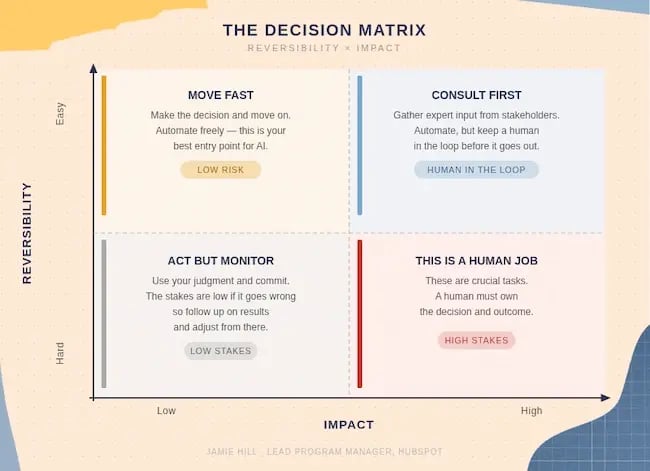
- Easy to reverse + Low impact: “Make that decision today and move on. A great example of something you can automate.”
- Easy to reverse + High impact: Consult your expert stakeholders. There may be a place for automation, but it should go through human review.
- Hard to reverse + Low impact: “Make the decision using your gut, then follow up later.” You may not be able to reverse it, but you can probably adjust if needed.
- Hard to reverse + High impact: These will be your crucial business decisions, and they need to be fully owned by a human. “This is something we cannot get wrong.”
6. Build in flexibility.
Jamie admits that in an early version, he “made the mistake of making things hyper-specific to the immediate work at hand, rather than thinking a few steps ahead.”
The next time he tried to apply his framework, tasks and assignments no longer lined up with his automations, so he was back to manually grabbing threads.
Instead, he advises asking yourself, “Will this work next time? Will this work if it’s slightly different?” while you’re building. “You don’t want to waste all this time building a system when a slight variation comes in and breaks it.”
7. Think marathon, not sprint.
“You cannot fix everything the first time, at scale, for good,” he warns. If you try to tackle it all at once with half-measures, you’ll only create timebombs for later. “Almost everything we build is iterative, and I expect it to change, but it’s layers of improvement.”
Sometimes that means certain steps will remain manual, or certain fires need to be allowed to burn. When this happens, Jamie stresses that it’s important to prep your team accordingly.
“Be like, ‘Hey, we cannot do anything about this. This might be a 60-hour week. Or you might have to meet with a bunch of people. It will be painful. Be ready. And that, in and of itself, should make it go better.’”
8. Leave breadcrumbs.
“If you’re doing process mapping, it means you’ve got something complex, which probably has other people involved. Eventually, you might not be the one doing this anymore — you’ll have somebody else supporting this thing — and you don’t want them walking in with no concept of how it’s working.”
That includes more than just a record of what you’ve already done. Be sure to also keep notes on future fixes, important decisions, and the rationales behind all of them.
9. Know when to bust out the white gloves.
While Jamie’s framework relies heavily on automation, he says it’s equally important to know what should not be automated.
Chief among those examples are customers or coworkers who are worth the “white glove treatment.” He gives the example of his co-worker, Maranda Thompson, who always works on key pillar products.
“If Maranda Slacks me, she will get my undivided attention, because if Maranda gets held up, everything gets held up.”
To identify these special points, Jamie asks himself, “Am I doing this [manually] because the process is broken?” Or because the outcome is worth the attention?



-2.png)